撰寫 Rules
Rules 用來教 Osprey 要尋找什麼,以及找到後應採取什麼行動。本頁說明 Osprey 規則語言 SML,也就是 Some Madeup Language,包括以 Models 定義 Features、針對 Features 撰寫 Rules,以及將 Rules 連接至 Effects。
延伸閱讀如下。
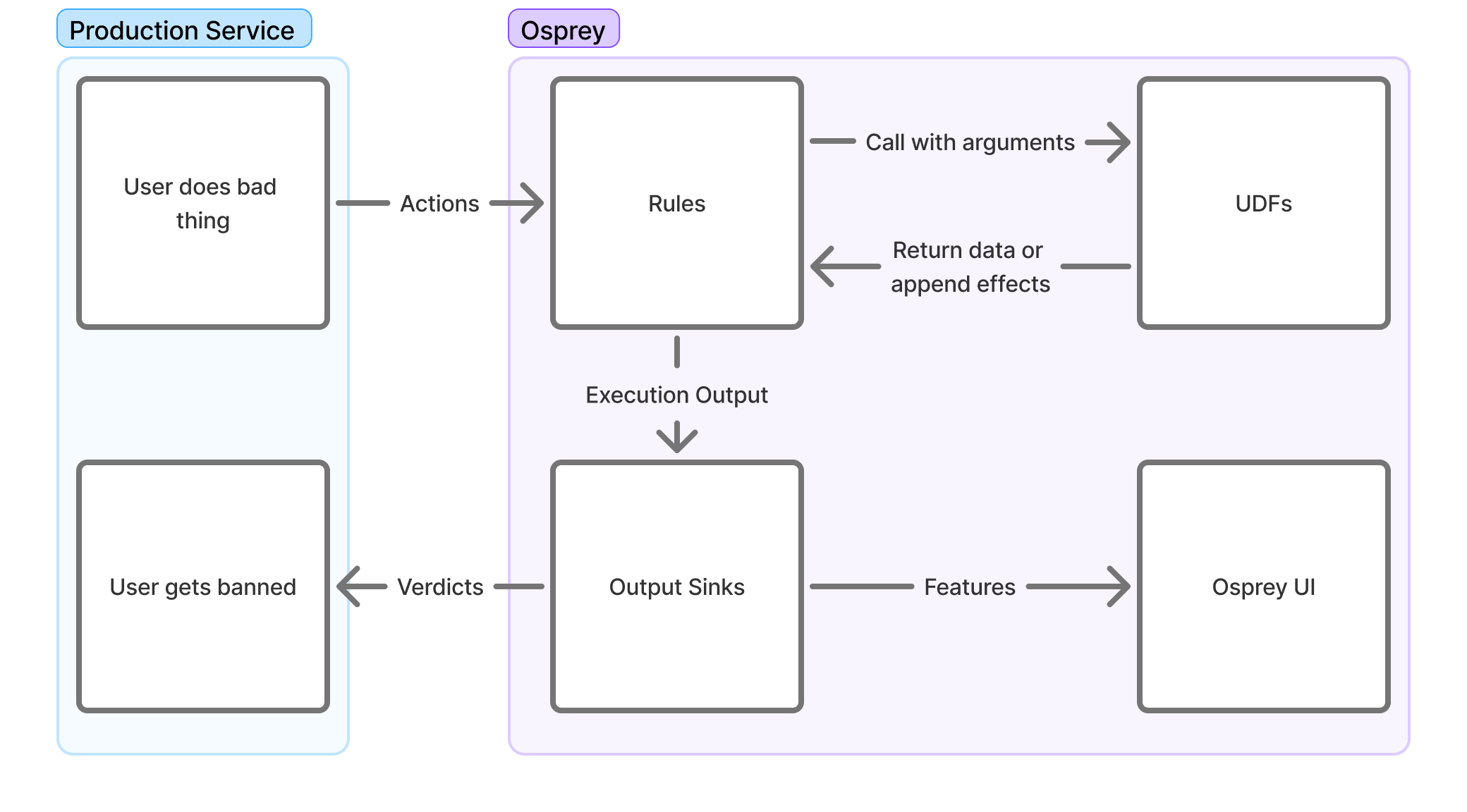
建立 Rules
Osprey Rules 使用 SML 撰寫。SML 是加入額外限制的 Python subset,以簡化 Rule 撰寫。Rules 可以只適用於網路上的單一 event type,也可以套用至多種 event types。
Rule 本身只會建立變數。若沒有對應的 WhenRules() function call,Rule 除了評估與查詢之外,不會產生其他 Effects。
Rules 目前透過同名的 Rule(...) function 支援下列概念。
-
Name
Rule_Name = Rule(...)Rule name 同時是 identifier,也是能在 Osprey UI 查詢個別 Rule hits 的 boolean Feature。Rule 啟用後重新命名,會使其與歷史查詢結果失去連結,因此應謹慎命名。
-
Logic
when_all=[]Rule logic 是
when_allparameter 中的 Signals 清單。Signal 可以是針對 Features 的 comparison、Label check、UDF call 或其他 Rule。若清單中任何 Signal 的結果是
None,整個 Rule 會得到None。詳見下方 None values。 -
Description
description=f''以一般文字說明 Rule 尋找的對象,並與 Rule 一起輸出至 logging 或 ticketing 等外部系統。這是 f-string,因此可以插入 Feature values,讓回應人員知道觸發 Rule 的具體原因。
下列簡單 Rule 使用多種 Signal evaluations 與內建 UDFs。
My_Rule_Name_v2 = Rule(
    when_all=[
        # Primary Signal
        MyFirstValue == True,
        HasLabel(entity=MyEntityName, label='MyLabel'),
        ListLength(list=UsersValues) == 5,
        # Secondary Signal
        RegexMatch(target=MyStringValue, pattern='(hello|world)'),
        MySecondValue >= 3,
        MyThirdValue != None,
        # Guardrail Signal
        (_LocalValue in [1, 2, 3, 5]) or (GlobalValue in ['hello', 'howdy']),
        not HasLabel(entity=MySecondEntityName, label='MySecondLabel'),
    ],
    description=f"{UserA} performed {ActionB} in this way. Emit warning",
)
Rule 結構
主要 Rules directory 通常可以維護兩個 subdirectories。rules directory 放置實際邏輯,models directory 定義出現在任何或特定 event types 的 Features。例如下列結構。
example-rules/
|  rules/
|  |  record/
|  |  |  post/
|  |  |  |  first_post_link.sml
|  |  |  |  index.sml
|  |  |  like/
|  |  |  |  like_own_post.sml
|  |  |  |  index.sml
|  |  account/
|  |  |  signup/
|  |  |  |  high_risk_signup.sml
|  |  |  |  index.sml
|  |  index.sml
|  models/
|  |  record/
|  |  |  post.sml
|  |  |  like.sml
|  |  account/
|  |  |  signup.sml
|  main.sml
Rules directory root 的 main.sml 是 entry point。它使用 Import 與 Require statements 控制載入哪些檔案及載入時機,讓專案可以組合不同邏輯。這種結構可以針對特定 event types 定義 Rules 與 Models,只執行必要 Rules。例如部分 Rules 只應用於 post event,因為只有 post 具有 text 或 mention_count 等 Features。
每個 directory 可以維護 index.sml,定義實際加入該 directory Rules 的 conditional logic。也可以將全部 conditional logic 放在單一檔案,但每個 directory 分別維護 index.sml 更容易整理。其他說明請見工作流程結構與檔案位置。
Models
實際撰寫 Rule 前,需要為 event type 定義 Model。下列範例假設社群網站允許使用者在 top level 建立貼文,或回覆其他 top level 貼文。每篇貼文可能包含文字、其他使用者的 mentions,以及選用的 link embed。Event JSON 結構如下。
{
	"eventType": "userPost",
	"user": {
		"userId": "user_id_789",
		"handle": "carol",
		"postCount": 3,
		"accountAgeSeconds": 9002
	},
	"postId": "abc123xyz",
	"replyId": null,
	"text": "Is anyone online right now? @alice or @bob, you there? If so check this video out",
	"mentionIds": ["user_id_123", "user_id_456"],
	"embedLink": "https://youtube.com/watch?id=1"
}
在 models/record directory 建立 post.sml,定義貼文 Features。
PostId: Entity[str] = EntityJson(
	type='PostId',
	path='$.postId',
)

PostText: str = JsonData(
	path='$.text',
)

MentionIds: List[str] = JsonData(
	path='$.mentionIds',
)

EmbedLink: Optional[str] = JsonData(
	path='$.embedLink',
	required=False,
)

ReplyId: Entity[str] = EntityJson(
	type='PostId',
	path='$.replyId',
	required=False,
)
JsonData UDF 會從 event JSON 內容定義 Features。將 models/record/post.sml Model import 至其他 Rules 後,就能參照這些 Features。若 JSON object 中的值不一定存在,可以將 required 設為 False;Feature 不存在時會得到 None。
userId 或 handle 等值出現在任何 event 中,若複製到每個 event type Model 會很繁瑣,因此可以在 models/base.sml 中定義一次。
EventType = JsonData(
	path='$.eventType',
)

UserId: Entity[str] = EntityJson(
	type='UserId',
	path='$.user.userId',
)

Handle: Entity[str] = EntityJson(
	type='Handle',
	path='$.user.handle',
)

PostCount: int = JsonData(
	path='$.user.postCount',
)

AccountAgeSeconds: int = JsonData(
	path='$.user.accountAgeSeconds',
)
此處為 UserId 使用 EntityJson UDF,而非一般 JsonData。UDFs 在下方說明。原則上,user IDs 等 identifiers 應定義為 Entities,方便後續在 Osprey UI 探索資料。
Model hierarchy
實務上可以建立 base Models hierarchy。
base.sml每個 event 都有的 Features,例如 user IDs、handles 與 account statsaccount_base.sml只出現在 account-related Events,但每個 account-related event 都有的 Features。類似方式也可以建立record_base.sml,放置所有 record Events 都有的 Features
這種 hierarchy 可以避免重複,Osprey 不允許重複定義,也能讓 Features 位於適當的 abstraction level。
使用 WhenRules 的 Effects
WhenRules() 將 Rules 連接至 Effects。在 rules_any parameter 列出 Rule objects,當其中任一結果為 true,就觸發 then= 中的 Effects。Osprey 內建 DeclareVerdict()、LabelAdd() 與 LabelRemove() 等 Effect UDFs;Effects 也能透過 output sinks 觸發外部服務。
下列 WhenRules() block 會拒絕 request,並為 user、email 與 domain 套用 Labels,供後續驗證追蹤。
WhenRules(
    rules_any=[
        Enabled_Rule_1,
        Enabled_Rule_2,
        # Disabled_Rule_1,
    ],
    then=[
        # Verdicts
        DeclareVerdict(verdict='reject'),
        # Labels
        LabelAdd(entity=UserId, label='recently_challenged', expires_after=TimeDelta(days=7)),
        LabelAdd(entity=UserId, label='verify', apply_if=NotVerified),
        LabelAdd(entity=Email, label='pending_verify'),
        LabelAdd(entity=Domain, label='recently_seen', expires_after=TimeDelta(days=7)),
    ],
)
WhenRules() 必須位於它參照的 Rules 之後。Effects 分散在檔案各處會難以追蹤,建議集中放在靠近底部的位置。
完成評估後,Effects 與其他 Execution Result 會交給部署環境的 output sinks。資料流說明後續流向,Integrations 與 Plugins說明如何加入自訂 output sinks。
User Defined Functions,UDFs
本頁幾乎所有 functions,包括 Rule、JsonData 與 EntityJson,都是 UDF,也就是以 Python 實作並提供給 SML 使用的函式。Osprey 內建 standard library,部署環境的開發者也能透過 Plugins 註冊自訂 UDFs。以 Python 撰寫 UDF 請見 Integrations 與 Plugins 的撰寫 UDFs。
目前部署環境可呼叫項目的權威清單位於介面中的 UDF Registry,包括 signatures、descriptions 與 categories。Standard library 包含 RegexMatch、ListLength、將 numeric string 轉成 integer 的 ParseInt、依 index range 取得 substring 的 StringSlice、Hash* family,以及取得處理中 event name 與 ID 的 GetActionName()、GetActionId(),和將 Entities 分組、逐步把 Rule rollout 至部分 traffic 的 Experiment、ExperimentWhen。
Custom UDFs 的 SML 呼叫方式與其他 functions 相同。Demo ruleset 的 Rule 建立在 custom TextContains UDF 上。
# example_rules/rules/post_contains_hello.sml
ContainsHello = Rule(
  when_all=[
    EventType == 'create_post',
    TextContains(text=PostText, phrase='hello'),
  ],
  description='Post contains the word "hello"',
)
Effect UDFs
部分 UDFs 不回傳供比較的 value,而是產生 Effect,也就是 Rule 評估後由 Osprey output sinks 執行的 structured output,例如停用使用者或通報貼文。Effect UDFs 會在 WhenRules() block 的 then= list 中呼叫。
# example_rules/rules/post_contains_hello.sml
WhenRules(
  rules_any=[ContainsHello],
  then=[BanUser(entity=UserId, comment='User said "hello"')],
)
實作 Effect UDF 與消費它的 output sink 屬於 Plugin 工作,請見 Integrations 與 Plugins。
Labels
Labels 是支援 stateful Rules 的標準 Plugin,會接觸 Osprey 多個部分。它們是套用於任意定義 Entities 的 tags。Rules 可以用 Effects 新增與移除 Labels,也能將 Labels 當作條件,使過去決定影響未來 Events。完整 pattern 將在範例說明。介面中的行為請見使用者指南的 Labels。
建立 Entities
Labels 會套用至 Entities。Entities 是使用 EntityJson UDF 建立的 Features,通常代表 user ID 或 email address 等能在 Events 之間保持一致的值。
# user.sml
UserId: Entity[str] = EntityJson(
  type='User',
  path='$.user_id'
)
Custom UDF 也能宣告 EntityT 作為 output type 來建立 Entities。
重要注意事項
None values
SML 中不存在的 Rule 或變數會是 None,可能代表資料缺少或 Rule 沒有執行。與許多 programming languages 不同,只要 Rule 具有 None Signal,就會完全跳過該 Rule 及 downstream Rules,除非 Rule 明確檢查 None。
Thing: int = JsonData(path='$.property_that_doesnt_exist')

# Evaluates to False
MyFirstRule = Rule(
    when_all=[
        Thing != None,
    ],
    description=f'Thing is present',
)

# Skips evaluation and sets to None
MySecondRule = Rule(
    when_all=[
        Thing > 1,
    ],
    description=f'Thing is greater than 1',
)

# Skips evaluation and sets to None
MyThirdRule = Rule(
    when_all=[
        MySecondRule,
    ],
    description=f'MySecondRule matched',
)
Workflow structure and file placement
SML files 可以組合,使 Rules 更容易理解。Import statement 會加入其他檔案的 Rules 與變數。
# models/action_name.sml
ActionName = "foo"

# main.sml
Import(
    rules=[
        'models/action_name.sml',
        'models/http_request.sml',
    ]
)

MyRule = Rule(when_all=[ActionName == "foo"], description=f'Action is foo')
Require 會選擇性執行其他 SML scripts。它支援 templating 與 conditionals,因此可以完全跳過 scripts,適合 AI service call 等執行成本較高的 Rule 或 UDF。
# main.sml
Require(rule=f'actions/{ActionName}.sml')  # will execute 'actions/foo.sml'

Require(rule='ai_services/my_ai_service.sml', require_if=ActionName == "register")
請接著閱讀範例,將上述概念組合為可執行及調整的完整 rulesets。